
MEETINGS. CONNECTIONS. WINNING MOMENTS.
Make your next meeting
one to remember.
Welcome your attendees, award unique entries, draw winners live and keep every prize organized. One giveaway system for your agents and the people they meet.
Your agents. Your branding. Your website.
FROM THE FIRST HELLO TO THE FINAL PRIZE
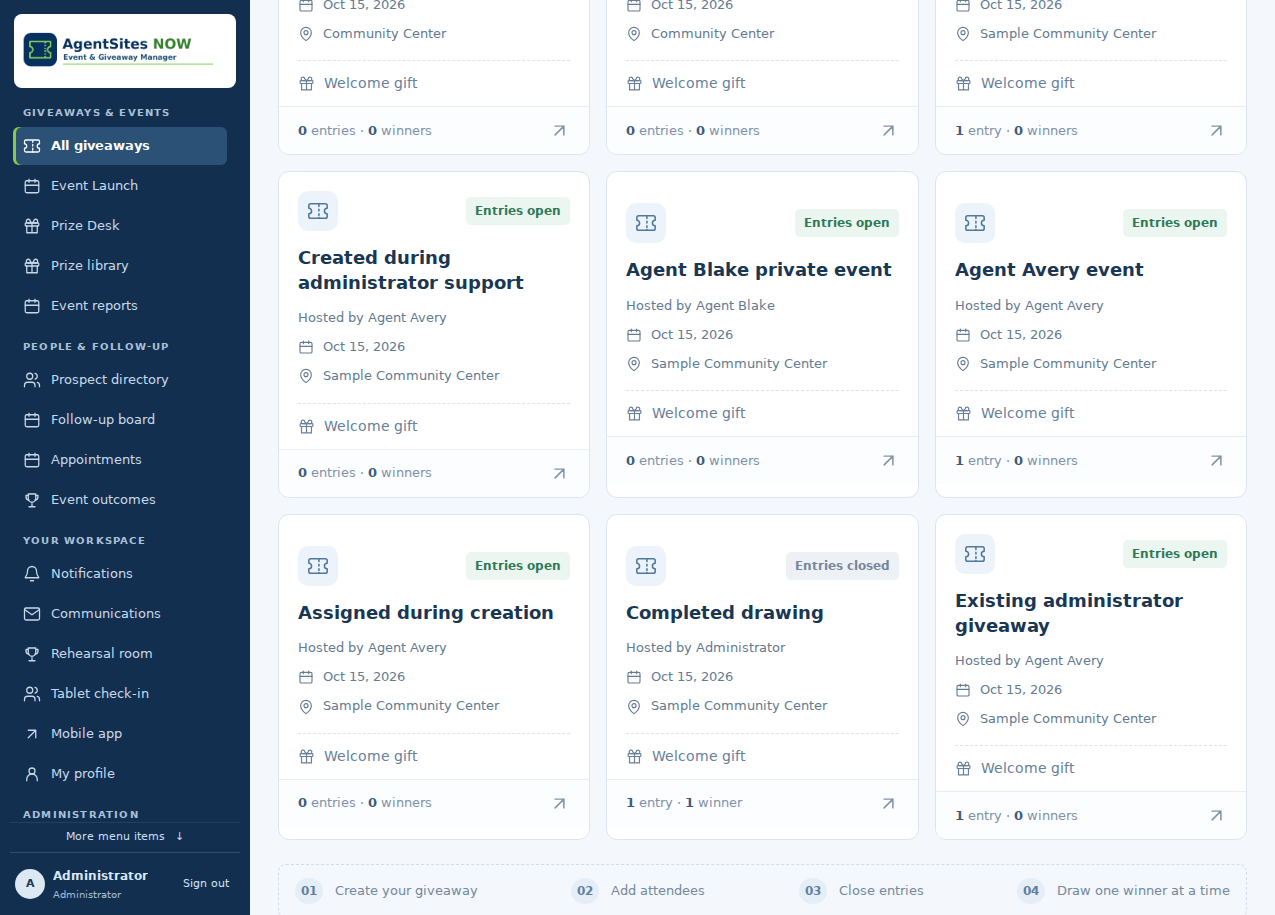
A clear path through every giveaway.
Prepare once, welcome your guests and enjoy the drawing. The system keeps the records together.
- 01
Create your event
Name the giveaway, choose a meeting date and add your prizes. Use the library to bring back favorites.
- 02
Welcome attendees
Add people, import a list or share the entry QR code. Approve registrations to issue entries.
- 03
Share the moment
Announce the drawing time, close entries and select one winner at a time. Participants can watch live.
- 04
Deliver the prize
Notify the winner, confirm their mailing address or pickup details, and record the prize as claimed.
THE COMPLETE FEATURE COLLECTION
Everything that keeps a giveaway moving.
From the check-in table to the next conversation, explore the tools available in Event & Giveaway Manager.
Welcome every attendee
Give people a simple way to enter, wherever your meeting takes place.
- Individual entry
- Add a name, email and optional phone number. Each accepted attendee receives one uniquely numbered drawing entry.
- QR registration
- Share a event-specific QR code or entry link. Agents review submissions before awarding entries.
- Tablet check-in
- Use a tablet as a check-in kiosk, with a visible scan-to-enter QR code for people using their own phones.
- Offline capture
- Save tablet check-ins when the connection drops, then sync and approve them when connected. Initial setup requires internet.
- CSV and Excel import
- Import CSV or .xlsx lists, match columns and review invalid or duplicate entries before entries are issued.
- Private mailing addresses
- Collect an optional street address, apartment or suite, city, state or province, postal code and country for prize delivery.
- Contact corrections
- Agents can correct contact details and mailing addresses while keeping drawing entry numbers. Participants can request corrections for agent approval.
- Duplicate review
- Repeated matching names and emails within the same giveaway do not receive additional entries.
Host with confidence
Keep the meeting, attendees and drawing together in one workspace.
- Event Control Room
- See entries, pending arrivals, eligible entries, available prizes and notification status in one event view.
- Flexible meeting details
- Name the giveaway, set its meeting date and add a location when needed. Meeting location is optional.
- Drawing schedule
- Set the drawing date, time and time zone. Publish the schedule for participants and send announcements or reminders.
- Close entries yourself
- The hosting agent chooses when entries close. The drawing stays under the host’s control.
- Multiple winners
- Run one random draw at a time. Choose the prize before drawing; previous winning entries are excluded from later draws in that giveaway.
- Event duplication
- Copy an event’s settings and prizes, including photos and descriptions, with an empty attendee list for the next meeting.
- Readiness checklist
- Review event details, attendees, prizes and public links. Changes can mark prior checks for review again.
- Rehearsal room
- Practice check-in approval, closing entries, drawing and the winner display using sample records without sending real emails.
Build a prize collection once
Prepare your giveaways, plan costs and follow every awarded prize.
- Prize Library
- Save reusable prize names, photos and detailed descriptions. Add a saved prize to a giveaway without entering it again.
- Private and shared prizes
- Agents manage their own saved prizes. Administrators can offer shared prizes for the team.
- Photos and details
- Show participants the actual giveaway with a prize photo and description. Broader image formats can be converted when the host supports them.
- Private purchase costs
- Record optional costs in USD, CAD, EUR, GBP or AUD. Saved costs stay out of participant prize views and emails.
- Website price finder
- Supply a public store page and review product matches by name or similar image before accepting a price.
- Optional daily price checks
- Monitor a confirmed product’s price on supported sites, with last-check status, private history and pause/resume controls.
- Prize Desk
- Find winning attendees across your giveaways. Review their contact details and private mailing address, and export fulfillment records.
- Claim and pickup tracking
- Record Awaiting contact, Contacted or Claimed with dates and notes. Verify participant pickup codes and retain pickup records.
Let participants follow along
Keep the winning moment within reach on a phone, tablet or larger screen.
- Live giveaway view
- Share the event’s live page for its schedule, prize gallery and saved results as the host draws.
- Private My Entries
- Participants use their emailed private link to view entries, winning prizes, claim status and their own contact details.
- Full-screen winner display
- Show the winner’s name, entry and prize on a television or projector without exposing contact details or mailing addresses.
- Home-screen installation
- Install the mobile web app on supported phones and tablets with the Agent Sites NOW home-screen icon. An Android app package is also included in the system.
- English and Spanish
- Participant screens and standard notifications support English and Spanish. Custom messages retain the language the agent writes.
- Larger text
- Participants can choose larger display text for easier reading on their devices.
- Ticket-link recovery
- Participants can request a fresh private entry email using the address they entered at registration.
- Calendar tools
- Download a drawing event or use a private calendar subscription, with options to replace or revoke its link.
Send emails that represent the agent
Keep attendees informed before the draw and make the next step clear afterward.
- Branded HTML emails
- Use professional email layouts with the host’s name, contact information, photo and logo when available, plus system-brand fallbacks.
- Agent identity
- Messages use the host’s sender display name and reply address. The sending email address comes from the configured SMTP account.
- Editable winner messages
- Administrators edit the winner email subject and wording, use supported placeholders, and preview the design.
- Entry confirmations
- Accepted attendees receive their entry and private access link when email delivery is configured.
- Drawing notices
- Send drawing announcements, schedule reminders and notify attendees of important event changes or cancellations.
- Participant campaigns
- Compose messages, choose recipients, preview, test, save a draft or schedule delivery. Review the audience before sending.
- Delivery attention
- Review queued, sent, failed and uncertain notifications. Sent means the SMTP server accepted the email; it does not prove the message was read.
- Participant preferences
- Participants choose drawing notices and separately opt in to optional agent updates. Follow-up emails default to off. Essential entry, winner and event-change notices remain available.
Continue the conversation
Organize the conversations that participants separately request.
- Prospect directory
- New contacts appear after a separate callback or appointment request. Historical prospect records remain available; drawing entry alone does not grant follow-up permission.
- Private notes and tags
- Keep useful context with a prospect, visible to authorized agents and administrators.
- Follow-up board
- Create and track follow-up tasks after a separate participant contact request, with due dates, notes and outcomes.
- Callback requests
- Participants can ask their agent to contact them through My Entries. Preferred times remain requests until confirmed.
- Appointment availability
- Set weekly availability, booking rules and days off so eligible participants can choose an available appointment.
- Appointment management
- Book, reschedule or cancel appointments and manage their email notices and reminders.
- Agent notification inbox
- Review activity that needs attention, choose email alerts and set quiet hours.
- Meeting outcomes
- Review attendance, returning prospects and follow-up results across meetings.
Every agent has their own workspace
Give each host the tools to run meetings under their own name.
- Individual accounts
- Administrators add agents with separate sign-ins. Agents manage their own giveaway attendees and events.
- Welcome emails and invitations
- Email new account details with a temporary password that must be changed, or send an expiring invitation to choose a password.
- Profile and branding
- Add the agent’s name, email, phone, company, photo and logo. Agent photos support uploads up to 5 MB.
- Account recovery
- Agents can change their password or request a secure password-reset email.
- Responsive workspace
- Use the host dashboard from a desktop, tablet or phone, with navigation designed for smaller screens.
- Administrator profile editing
- Administrators can update agent names, email addresses, phones, photos and logos, or disable access when needed.
Keep the whole system in view
Give administrators oversight without mixing agents’ everyday work.
- Team overview
- Review activity by agent, open giveaways, entry totals, winners and notifications needing attention.
- View as agent
- Administrators can open an active agent’s workspace with that agent’s permissions. A support banner provides a return button, and actions identify the administrator.
- Assign a hosting agent
- Create a giveaway for an agent or assign an existing one before its first drawing. Events with follow-up or appointment records remain with the current host.
- Edit any giveaway
- Administrators can change giveaway details and help agents correct an event.
- Reopen closed entries
- Reopen a giveaway after an accidental closure while preserving existing entries and winners. Previous winners remain excluded.
- Giveaway Trash and restore
- Move giveaways to Trash or restore them for review, with public links disabled until the administrator chooses to enable them.
- Activity history
- Record attendee changes, entry closure, draws, claims and administrative actions with the responsible user.
- Draw receipts
- Keep a saved receipt for each supported draw, with verification tools and event reports.
- Reports and CSV exports
- Print event reports and export attendees, winners and Prize Desk records. Mailing addresses appear only in authorized exports.
- Backups and signed updates
- Create, download and restore protected dashboard backups, schedule backups and install signed system updates.
- Storage cleanup
- Administrators can review file sizes, filter saved archives and remove selected leftover uploads or expired update files. Active updates, system files, uploaded images and restore points are protected from cleanup.
- System health
- Check the scheduled worker, email setup, backup readiness and hosting requirements from the administration tools.
A PLACE FOR YOUR PARTICIPANTS
The giveaway goes
where they go.
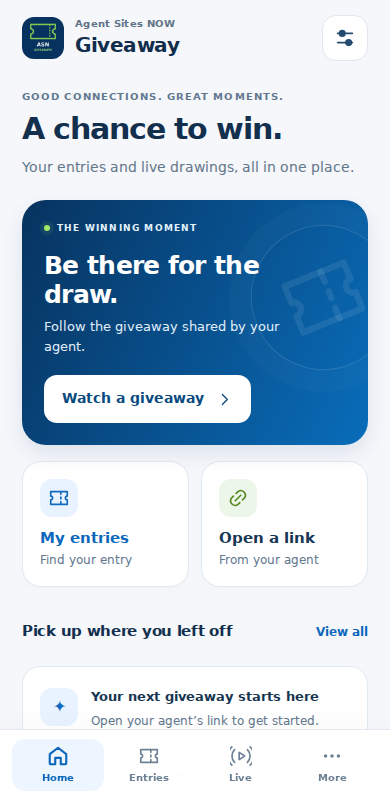
A mobile experience that lets attendees find their entries, explore prizes, follow the drawing and contact their hosting agent.
- Open the agent’s shared giveaway link.
- Keep entries together through a private email link.
- Install the web app on a supported home screen.
- Choose English, Spanish or larger text.
Phone QR entry and live results need an internet connection. Offline entry capture is available through the prepared tablet kiosk.
THE PART EVERYONE LOOKS FORWARD TO
A winning moment.
A clear record.
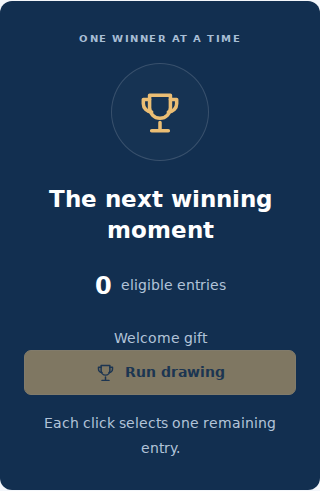
Select a prize, run the draw and let the system save the winner. Continue with another prize when you are ready.
Keep personal details private
Public results show the winner’s name, entry and prize. Emails, phone numbers, mailing addresses and private purchase costs stay off the public display.
Keep the next step personal
The winner’s email includes the hosting agent’s details. Use the Prize Desk to arrange delivery or verify pickup, then record the outcome.
A FEW HELPFUL DETAILS
Before your first giveaway.
Can every agent run their own giveaways?
Yes. Administrators create individual agent accounts. Agents work with their own giveaways and attendees, while administrators can oversee the system and help with changes.
Does registering immediately create an entry?
QR and tablet registrations need the agent’s approval. Directly added attendees and accepted import rows receive one entry. Matching duplicates within a giveaway do not get an additional entry.
Do attendees have to enter a mailing address?
No. The mailing-address section is optional. When an address is provided, the host and administrators can use it to arrange prize delivery. Participants can review their own address through My Entries and request a correction. Confirm the address before mailing.
Can we give away more than one prize?
Yes. Add individual prizes and choose an available prize before each draw. Each click selects one remaining entry; previous winning entries are excluded from later draws in that giveaway.
Can the system automatically draw at the scheduled time?
The published time and reminder emails help people know when to return. The agent still closes entries and clicks Run drawing to draw each winner.
How does website price monitoring work?
Provide a public store page, review a matching product and confirm its identity before accepting the price. Optional daily checks need the scheduled worker and supported product data. Some retailers block automated access or display location-dependent prices, so manual costs remain available. This is not a universal internet or reverse-image search. Tax, shipping and currency conversion are not calculated.
Will it run on our existing website?
Event & Giveaway Manager is a standalone PHP/MySQL application. WordPress is not required. Email features need configured SMTP; scheduled reminders, alerts and daily price checks need the scheduled worker. HTTPS and supported browser storage are needed for the installable mobile experience and offline kiosk.
READY FOR THE NEXT MEETING?
Bring everyone into the moment.
Open your agent workspace to prepare your next giveaway.